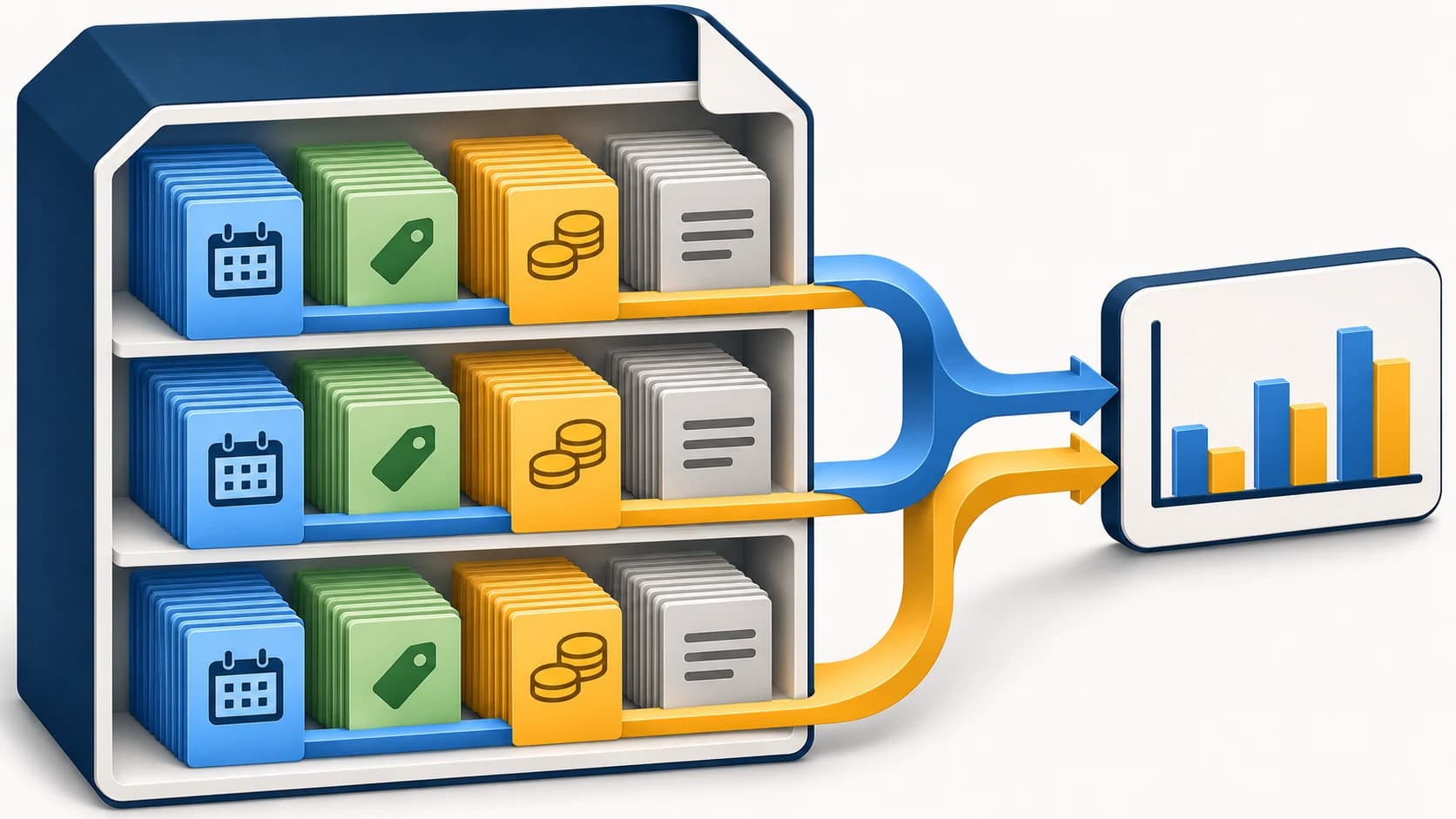
Apache Parquet is an open, binary, columnar file format for storing and reading structured data. It preserves the schema and field types, supports compression, and lets an analytics engine read only the columns it needs. Parquet is useful for sales history, event data, exports from accounting systems, and machine learning datasets. It is especially well suited when the same datasets are repeatedly filtered and aggregated. Apache Parquet project overview.
Imagine a company that exports orders every day. The manager needs sales by month, the analyst needs repeat purchases, and the ML developer needs demand history. If each process parses text files again from scratch and defines types differently, extra work and discrepancies appear. Parquet provides a common format for the prepared layer, while business meaning, source data quality, and access permissions remain the system's responsibility.
This guide is for analysts, developers, and managers choosing how to store analytical data. We will cover the file structure, how it differs from CSV and JSON, reading with Python and SQL, partitioning, and where it makes sense to use it. Setting up a distributed cluster and a production-grade data store requires a separate project.
The documentation was checked on November 3, 2026. The PyArrow and DuckDB examples below were actually run locally on six fictional rows. Write, round-trip reading, filtering, SQL aggregation, and reading a partitioned dataset were verified. Speed on large volumes, storage savings, and cloud storage behavior were not measured.
Contents:
- What business tasks Parquet is used for
- How columnar storage works
- What a file consists of: row group, column chunk, and page
- Why Parquet needs metadata and a footer
- Schema and types: what is preserved with the data
- NULLs, nested objects, and reader compatibility
- Parquet vs. CSV vs. JSON: which format to choose
- How Parquet differs from Arrow, databases, and Iceberg
- Compression and encoding: Snappy, Zstandard, and dictionaries
- How filters help read less data
- How to open and read a Parquet file
- Verified example: writing Parquet with Python and PyArrow
- What we got from local reading and an SQL query
- Partitioning: when one file is no longer enough
- How to choose file sizes and avoid tiny partitions
- How to change the schema and update data
- Where Parquet fits in the AI and ML workflow
- Common mistakes and how to fix them
- Frequently asked questions about Parquet
What business tasks Parquet is used for
Look at recurring work with data. If employees pass around a small table and edit it manually, ease of sharing may matter more than the storage format. If different reports are constantly built from the same transaction history, a single typed dataset that can be read programmatically becomes useful.
For example, an e-commerce company has order, payment, and return events. From them, separate analytical tables can be prepared: order line items, status changes, daily inventory balances. Parquet is well suited for storing these prepared exports. At the same time, the file needs a clear level of granularity: one row should mean an order line, an event, or a balance as of a date. Mixing these entities will distort calculations regardless of format.
| Task | What role Parquet can play | What needs to be defined separately |
|---|---|---|
| Management analytics | Store transaction history for reporting | Definitions of revenue, returns, and the period |
| Demand forecasting | Store prepared features and target values | Forecast horizon and feature availability at the time of calculation |
| Event analysis | Contain normalized events for sampling | Event ID and duplicate-removal rule |
| Exchange between processing jobs | Pass a table with explicit types | Compatibility of specific readers and writers |
| Archive of analytical extracts | Store dated datasets | Extract composition, retention period, and restoration order |
These are architectural options, not implementation results from customers. For general source-data organization, a separate article on preparing data for AIis useful.
How columnar storage works
In a conventional table, we see rows: order, date, product, quantity, amount. With columnar storage, values from the same column are stored together inside the relevant parts of the file. If a report needs only the date and amount, the engine can read those fields without necessarily loading all text descriptions. The ability to read only selected columns is used, for example, in PyArrow. Source: reading Parquet in Apache Arrow.
Suppose the export includes a long manager comment, a delivery address, and a technical JSON payload. They are not needed to count orders by date. Selecting only the necessary fields reduces the amount of data that must be passed into downstream processing. If a query needs all columns and all rows, however, the benefit of selective reading is reduced.
Columnar organization helps explain why Parquet is often chosen for analytics. But it does not imply a universal tenfold speedup. Results depend on the data itself, the query, the library, compression, storage, and file placement. This article does not include a performance benchmark.
What a file consists of: row group, column chunk, and page
Parquet uses three main levels of data organization. Row group — a group of rows. Inside it, each column has a column chunk, meaning a block of values for that column. It consists of pages, data pages. Pages are tied to encoding and compression, while the column block is tied to reading the corresponding field. This hierarchy is defined in the official Parquet concepts description.
Imagine an order log divided into several consecutive groups. Each group contains its own dates, products, and amounts, but values from different fields are physically organized separately. The reader first identifies the appropriate groups and fields, then decodes the needed parts. This is a simplified model for understanding, not a byte-by-byte layout of a specific file.
The size of a row group affects the trade-off between sequential reading, memory usage, and the ability to skip groups. So a “large file” and a “large row group” are different characteristics. One file can contain several row groups; in the small demo file below, there will be three.
Why Parquet needs metadata and a footer
Metadata describes the file structure and the location of data parts. In the standard Parquet layout, file metadata is written after the data, near the end—in the area usually called the footer. The reader uses it to find the column blocks it needs. The placement order is described in the file format specification.
This leads to a practical takeaway: proper write completion matters. The presence of a file with the .parquet extension does not by itself prove that the dataset is ready for consumers. The data publishing process should separate the write operation from the moment the finished version appears in the working directory.
File metadata and page headers serve different purposes. The former helps with file navigation, while the latter is used when reading and decoding individual pages. Source: Metadata in Apache ParquetWhen diagnosing an issue, it helps to first look at the schema, the number of rows and row groups, and only then try to load the entire table into memory.
Schema and types: what is stored along with the data
Parquet has a small set of physical types: integers, floating-point numbers, boolean values, and byte arrays. The file’s data representation is built on top of these types. Parquet physical types.
Logical types define the meaning: string, decimal, date, timestamp. For DECIMAL, precision — the total number of digits — and scale — the number of digits after the decimal point — are important. For timestamps, the unit of measurement and time semantics matter. These details are described in the logical types specification.
In a project, it is worth defining the schema in writing before bulk writes. A customer ID may consist only of digits but still be stored as a string. Price requires consistent precision, and an operation date must be distinguished from its load time. The format will preserve the structure passed to it; the team defines the meaning of the fields.
In the tutorial example, unit_price has the type decimal128(12, 2), SKU is a string, order_date is a date. This is the demonstration schema chosen for the example. It does not establish universal requirements for accounting data, currencies, or product catalogs.
NULL, nested objects, and reader compatibility
A missing value should be distinguished from zero, an empty string, and an empty list. In business terms, the difference matters: an unknown price, a free product, and a field not provided by the source are different situations. In the example, one price is zero and another is missing; after writing and reading, these states should be preserved.
Parquet can represent nested structures and repeated values. It uses definition and repetition levels to describe the presence of nested fields and elements in repeated structures. Details are provided in Nested Encoding. For the first analytics dataset, it is easier to start with a clear flat table if the task does not require lists and objects.
Support for specific features depends on the implementation. The phrase “both systems support Parquet” does not replace checking decimal fields, timestamps, nested types, and the chosen codec. Apache publishes the implementation support matrix. It is useful for planning, but you should still verify your own write → read pair on the required versions.
Parquet vs. CSV vs. JSON: which format to choose
CSV is convenient for simple tabular exchange, JSON is suitable for messages and objects with fields, and Parquet is built for programmatic analytics work with typed tables. The basic properties of text formats are described in the CSV documentation and the JSON specification. The choice depends on the consumer. If a partner accepts only CSV according to an approved template, internal use of Parquet does not cancel that exchange contract.
| Criterion | CSV | JSON | Parquet |
|---|---|---|---|
| Read in a plain text editor | Convenient for small files | Convenient for individual objects and small datasets | Requires a tool that understands the binary format |
| Field types | Usually defined by import rules | Basic JSON types are available; business semantics are defined separately | Schema and types are built into the format |
| Selecting specific columns during analytical reads | Not a core feature of the format | Not a core feature of the format | Matches the column-oriented layout |
| Manual editing | Possible, but requires care | Possible, but easy to break the structure | Usually changed through a processor and rewritten |
| Typical part of the workflow | Table exchange | APIs and messages | Prepared analytics datasets |
The table describes common use cases, not a prohibition against other options. CSV can be compressed, JSON can be stored line by line, and additional indexes can be built for text formats. When comparing real solutions, you need to consider the full workflow, not just the file extension.
If the source CSV has already lost digits from an ID, conversion will not restore them. In that case, first go back to a correct source. This is covered in the review of preserving SKUs and prices when preparing CSV for AI. Here the main task is different: organizing a prepared dataset and reading it analytically.
How Parquet differs from Arrow, databases, and Iceberg
Apache Arrow and Parquet solve different data representation tasks. In our example, an Arrow Table is the table the program works with, while Parquet is the format it is written to on disk. Reading and writing happen between them. So Arrow support in a library and the presence of a Parquet file are different parts of the same process.
A Parquet file also does not replace a full DBMS. To run SQL, you need an engine: for example, DuckDB reads Parquet directly through read_parquet. For an application with frequent updates to individual records, concurrent operations, and transactional requirements, the choice of operational storage should be made separately from the analytics export format.
Apache Iceberg belongs to the table-format layer: it defines tables, snapshots, metadata, and consistent changes on top of data files. Parquet can be the format of the files inside such a table. These layers are discussed in the Iceberg specification. A regular folder of Parquet files does not, by itself, gain the properties of a managed Iceberg table.
A practical choice can be stated this way: first define which operations the system must support. Then choose the engine and the way the table will be managed. The file format will be part of the solution, not the entire architecture.
Compression and encoding: Snappy, Zstandard, and dictionaries
In Parquet, data encoding and compression are different mechanisms. Dictionary encoding replaces repeated values with dictionary references; if the dictionary becomes too large, the implementation may switch to plain encoding. This is especially clear in a column such as order status, where values repeat. Parquet encoding descriptions.
The compression codec works on page data. The specification provides several options, including Snappy, GZIP, and Zstandard. Their characteristics involve a tradeoff between size and processing cost; availability should be checked in reading and writing tools. Compression specification.
In the local demo, the selected setting is compression="zstd". This is an explicit setting for a reproducible example, not proof that Zstandard is optimal for every workload. On a real dataset, compare write time, size, query time, and resource usage. The comparison should use the same source data and the same query semantics.
Do not estimate savings based on a single very small file. The format has overhead structures, and their share changes with the volume and composition of the data. For a storage decision, a repeatable production workload matters more than a pretty ratio from someone else’s presentation.
How filters help you read less data
There are two useful mechanisms. Projection pushdown means pushing column selection down to the read layer. Predicate pushdown means pushing filter conditions down to where the data is read. If the metadata makes it possible to exclude some row groups, the engine may not have to process them at all. Capabilities depend on the reader and the specific condition; filter support is documented in PyArrow read_table.
The idea is easy to show with dates. If a row group contains only October orders, but the query needs November, the value range makes it clear that the group does not match. If dates from several years are mixed in each group, the bounds will be wider and it will be harder to skip data. That is why write order should be aligned with common filters.
Sorting before writing and choosing row groups are part of dataset tuning. DuckDB separately explains how row order affects group skipping based on statistics. Parquet Tips. But the presence of WHERE alone does not prove how many bytes were read: that conclusion requires the plan and measurements from a specific execution.
How to Open and Read a Parquet File
To get started, you need a reader and access to the file. In Python, PyArrow is convenient; for SQL users, DuckDB may be a good fit. In a production workflow, you should pin versions and verify schema support in the final tool. Opening the file in a plain text editor will show binary content, not a usable table.
Start with the metadata: column names, types, row count, and number of groups. Then read a few required fields or a limited slice of the data. Do not convert a large file into a list of Python objects just to inspect the first few records.
For batch reading, PyArrow provides ParquetFile.iter_batches(): it returns a sequence of record batches. This makes it possible to build processing without having to read the whole table in one call. The method's capabilities are listed in the ParquetFile reference. If you then collect all batches into one list, memory usage will rise again, so you should preserve batch processing in later steps too.
In the demo below, to_pylist() is safe from a size perspective precisely because it returns only two sample rows. Its use here is not a recommendation for exporting a large dataset in full.
Verified Example: Writing Parquet in Python with PyArrow
Below, a sample table of six order line items is created. The quantity field means the number of units in the line item, and unit_price is the price of one unit in rubles. The IDs are text values, the price is decimal, and the date uses a calendar type. One order is canceled, and another line item is pending and has no price.
Create a separate working folder. For a standard Linux/macOS setup, installation in a virtual environment looks like this:
python3 -m venv .venv
.venv/bin/python -m pip install pyarrow==26.0.0 duckdb==2.0.0
These versions were used in a local run with Python 3.14.3. The installation commands were executed in an isolated environment; installation on a different OS or architecture was not tested here. Check the current requirements in the PyArrow installation documentation . On Windows, the path to the virtual environment interpreter is different.
Save the following code as demo_parquet.py. It stops if orders.parquet already exists so it does not accidentally overwrite the previous example.
from datetime import date
from decimal import Decimal
from pathlib import Path

import duckdb
import pyarrow as pa
import pyarrow.parquet as pq

# Run this in a new working folder: we do not overwrite an existing file.
path = Path("orders.parquet")
if path.exists():
    raise FileExistsError("Choose a new folder or keep the existing orders.parquet")

schema = pa.schema([
    ("order_id", pa.string()),
    ("order_date", pa.date32()),
    ("sku", pa.string()),
    ("quantity", pa.int32()),
    ("unit_price", pa.decimal128(12, 2)),
    ("status", pa.string()),
])

data = {
    "order_id": ["o1", "o2", "o3", "o4", "o5", "o6"],
    "order_date": [date(2026, 10, 30), date(2026, 10, 31),
                   date(2026, 11, 1), date(2026, 11, 1),
                   date(2026, 11, 2), date(2026, 11, 2)],
    "sku": ["00123", "A-17", "00123", "000123456789012345", "A-17", "B-04"],
    "quantity": [2, 1, 1, 3, 2, 1],
    "unit_price": [Decimal("1299.90"), Decimal("2500.50"),
                   Decimal("1299.90"), Decimal("0.00"),
                   Decimal("2500.50"), None],
    "status": ["paid", "paid", "paid", "cancelled", "paid", "pending"],
}
table = pa.table(data, schema=schema)
pq.write_table(table, path, compression="zstd", row_group_size=2)

restored = pq.read_table(path)
assert restored.equals(table)
pf = pq.ParquetFile(path)
print("Rows:", pf.metadata.num_rows)
print("Row groups:", pf.metadata.num_row_groups)
print("Schema:", restored.schema)

selected = pq.read_table(
    path,
    columns=["order_id", "sku", "unit_price"],
    filters=[("order_date", ">=", date(2026, 11, 1)),
             ("status", "=", "paid")],
)
print("Selection:", selected.to_pylist())

query = """
SELECT sku, SUM(quantity * unit_price) AS amount
FROM read_parquet('orders.parquet')
WHERE order_date >= DATE '2026-11-01' AND status = 'paid'
GROUP BY sku
ORDER BY sku
"""
with duckdb.connect() as con:
    print("SQL:", con.execute(query).fetchall())
Run:
.venv/bin/python demo_parquet.pyThe write parameters are described in pyarrow.parquet.write_table . The value row_group_size=2 is intentionally small here: it makes it possible to see three groups across six rows. Do not carry this setting over to a production export. In this function, the group size is defined by the number of rows, not bytes.
What the Local Read and SQL Query Returned
Reading the file back produced a table that matched the original according to restored.equals(table) . The metadata showed six rows and three row groups. String SKU values, the date, the decimal128(12, 2) type, and the missing price value were preserved. This is a functional check of a specific pair of libraries and sample data, not proof of compatibility across all systems.
The filter selected paid items with dates starting from November 1, 2026. Out of the six original records, o3 and o5 were returned. The condition uses order_date and status , while the returned table keeps only order_id , sku and unit_price . That is how filter fields and result fields are separated.
DuckDB read the same file. The SQL grouped line items by SKU and summed quantity times price. Direct Parquet Reads in DuckDB do not require creating a persistent database table first.
| SKU | Amount in the example condition, RUB | Source data |
|---|---|---|
00123 |
1299.90 | One paid November line item, quantity 1 |
A-17 |
5001.00 | One paid November line item, quantity 2 |
The canceled line item was excluded because of its status. The item without a price was also excluded because of its status, so this query does not test the separate rule for how the aggregate handles an unknown price. In real-world analytics, that rule should be stated explicitly: exclude the record, show a warning, or calculate a different metric.
The meaning of the word “sum” also matters here. There are no discounts, tax calculations, refunds, or multiple currencies. The result cannot automatically be called accounting revenue. For business definitions, a useful reference is the article on the semantic layer for AI analytics.
Partitioning: when one file is no longer enough
Partitioning splits a dataset into parts based on selected keys. In the common Hive approach, the value is written in the directory name: for example, month=2026-11. A reader that understands this structure uses the value as a field in the dataset. This approach is described in the DuckDB Hive Partitioning documentation.
If most queries relate to a specific month, this organization can help select the needed files. If queries always scan the full history, splitting by month alone does not guarantee any benefit. The choice of key should follow common query patterns and the data distribution.
To continue the example, add the following snippet to the end of demo_parquet.py and run the entire script in a new empty working folder. The variables table, data and pa are created by the main code, so this snippet is not intended to run on its own.
import pyarrow.dataset as ds

partitioned = table.append_column(
    "month",
    pa.array([day.strftime("%Y-%m") for day in data["order_date"]]),
)
ds.write_dataset(
    partitioned,
    base_dir="orders_by_month",
    format="parquet",
    partitioning=ds.partitioning(
        pa.schema([("month", pa.string())]), flavor="hive"
    ),
    existing_data_behavior="error",
)
dataset = ds.dataset("orders_by_month", format="parquet", partitioning="hive")
november = dataset.to_table(
    columns=["order_id", "sku", "unit_price"],
    filter=(ds.field("month") == "2026-11") & (ds.field("status") == "paid"),
)
print("Partition:", sorted(november["order_id"].to_pylist()))
The write API and behavior for existing data are defined in write_dataset. The selected mode here is existing_data_behavior="error": reusing a non-empty destination requires a separate decision. In the local check, directories for two months were created; filtering for November and paid status returned o3 and o5.
This demonstrates partition semantics. It was not measured how many files and bytes the reader actually skipped, and remote object storage behavior was not tested.
How to choose file sizes and avoid tiny partitions
Do not create a separate file for every row or a separate partition for every unique order. That approach can create many objects that then have to be listed, opened, and maintained. An analytics workload usually calls for a larger processing unit.
Instead of a universal “correct size,” start with questions like: how much data arrives per period, which filters reports use, how many concurrent readers are active, and how much memory the processor has available. Then compare several options under the same workload. Change one factor at a time so you can understand the cause of the result. Performance factors are discussed in the DuckDB file formats guide; the benchmark results there cannot be transferred directly to your own data.
Row group size and on-disk file size are controlled by different parameters; the same number of rows can take up different space because of field width and compression. Parameters such as ROW_GROUP_SIZE in different engines cannot automatically be treated as having exactly the same behavior. The limitations of a specific implementation must be read in its documentation.
For a working dataset, consolidation of small files can be useful if observations support it. When designing it, take consumers into account: they should see a consistent version of the data, not a random mix of old and new parts during a rewrite.
How to change the schema and update data
Schemas can change: a currency appears, a new status is added, a sales-channel flag is introduced. Adding a column and changing the meaning of an existing one are different events. A particularly risky situation is when a field is still called amount, but it used to mean the total without shipping and now includes it.
Document the rules: which fields are required, which may be missing, how an unknown value is interpreted, and what counts as a compatible extension. Test the new schema with tools that actually read the dataset. Do not rely only on successfully creating one new file.
DuckDB provides union_by_name, which allows files with different sets of columns to be combined by name and fills missing values with NULL. This is a documented reader capability, not a universal schema versioning mechanism. Type compatibility and business meaning still need to be verified. Source: Parquet Tips.
For a simple periodic dataset, a new catalog version with a clear publication date may be enough. If you need coordinated table changes, parallel writes, snapshots, and deletion of individual records, consider a suitable table layer or database system. An ever-growing homegrown update protocol is a reason to revisit the architecture. Consistency limitations when working with ordinary file datasets are discussed in the Arrow Datasets documentation.
Where Parquet fits in the AI and ML workflow
In machine learning, it is useful to separate raw events, prepared features, and specific training datasets. Parquet can store the tabular outputs of these stages. Information about the source, time period, transformation version, and target-label creation rule should exist alongside it.
For example, for demand forecasting, it is important to know which inventory levels and prices were available at the moment of prediction. Accidentally adding future information to features will create target leakage. The file format will not detect that mistake on its own; it is prevented by dataset design rules and data validation.
For LLM analytics, a different boundary is useful: the application runs an authorized query against a structured dataset, and the model receives a result of the appropriate size and explains it to the user. Passing an entire order history into a text context without need is usually inefficient. At the same time, query execution rights and column access should be determined outside the generated answer.
Parquet is also not a vector index and does not perform semantic search on its own. It can be part of storage for texts, identifiers, or prepared representations, but search, corpus freshness, and access control are handled by separate components. So choosing Parquet for the data layer does not solve the entire enterprise AI assistant project.
Common mistakes and how to fix them
| Mistake | How it shows up | What to change |
|---|---|---|
| Converted data without an explicit schema | The same column has different types in different files | Define the schema and validate reading it together |
| We only checked the number of rows | NULL values, precision, or identifier meaning were lost | Compare types, keys, and sample values |
| They read all fields for a single metric | Unnecessary data gets pulled into processing | Specify the needed columns and inspect the query plan |
| They created partitions that are too small | The catalog consists of many small pieces | Review the keys and coarsen the granularity for your workload |
| They publish the catalog during a rewrite | Consumers receive an inconsistent snapshot | Separate version preparation from publication |
| They assume a smaller file means faster processing | The production query is still running slowly | Measure reading, processing, and result delivery separately |
| They assume a binary file is secure | Sensitive fields are accessible | Configure access rights and data handling in the infrastructure |
Compression and binary representation are not access control. Likewise, successfully reading a file does not confirm the correctness of the metric. Both boundaries need to be considered when handing off a dataset between teams.
Parquet FAQs
Can you use Parquet without Hadoop and Spark?
Yes. In this article, the file was created and read locally with PyArrow, and SQL was run in DuckDB. A distributed cluster is not required for the scenario shown. The choice of cluster depends on the workload and infrastructure.
Will any CSV get smaller and faster after conversion?
That promise cannot be made. The result depends on the data mix, codec, dataset size, and query. You need to test your own workload. Here, comparative sizes and timing were not measured.
Can you open Parquet in pandas?
pandas has a read_parquet interface; it requires a supported engine. Requirements and parameters are listed in the official pandas documentation. In the local example, pandas was neither installed nor tested: PyArrow and DuckDB were used.
Can you fix a single row directly in the file?
For a typical application workflow, expect to transform and rewrite the relevant part of the dataset. If the task requires frequent edits to individual records and consistent transactions, choose the appropriate table management layer. The .parquet extension itself does not provide these capabilities.
Does Parquet preserve the original business logic?
It preserves the represented values and structure within the capabilities of the tools used. But metric definitions, rounding rules, cancellation filters, and access permissions need to be documented separately. Otherwise, two correct SQL queries can answer different questions under the same metric name.
When is it better to keep CSV?
When you need a small human-readable file, manual exchange, or a required template for an external system. The internal analytics layer can still use Parquet, while CSV is generated at the exchange boundary. These approaches can be combined in one process.
How Vladimir Lomtev's AI studio helps build a data layer for AI
In a project, the key is the path from source operations to a reproducible dataset for reporting or a model. Vladimir Lomtev's AI studio can help prepare the data and field schema, connect sources to an analytics or AI workflow, and set up transformation testing. For forecasting tasks, this also includes preparing data for the chosen ML task.
The first step is to choose one process: for example, a monthly order analysis. Define the current calculation method, sources, access restrictions, and success criteria. After that, you can make an informed choice of Parquet, update method, and reading tools. Discuss the project.
How to decide on Parquet
Parquet is worth considering for regularly used analytics tables where explicit types, column selection, and handler compatibility matter. Start with one dataset and a few real questions about it. Define the schema, write the data, read it with the final tool, and compare the values and meaning of the result.
The local demo shows how to set up this workflow on a small example. A production solution also needs rules for version publication, schema changes, access, and measuring your workload. This approach makes it possible to choose the right format for the task and avoid copying demo settings into production without validation.